 HubShots
HubShots Episode 314: HubSpot Loop Marketing Explained
In this edition we dive into, INBOUND 2025 Reflections, HubSpot’s Loop Marketing Playbook, what is it, and why, and more!


This edition we dive into:
How to consume HubShots:
Did a colleague forward this episode to you? Sign up here to get yours every Friday.
Recommended Resources:
Listen to Spotify:
Watch on YouTube:
Recorded: Thursday 02 July 2026 | Published: Friday 10 July 2026
People are overwhelmed, in personal life, in corporate life.
This includes the platforms they use, of which HubSpot is just one of many.
As platforms come up for renewal, people are less tolerant of complexity, sales hassle, and inflexible pricing. They are questioning everything, and in cases where they are too overwhelmed, they often just cancel outright.
I wrote a long (and ironically overwhelming) article about this. The responses I received from listeners and clients were along these lines:
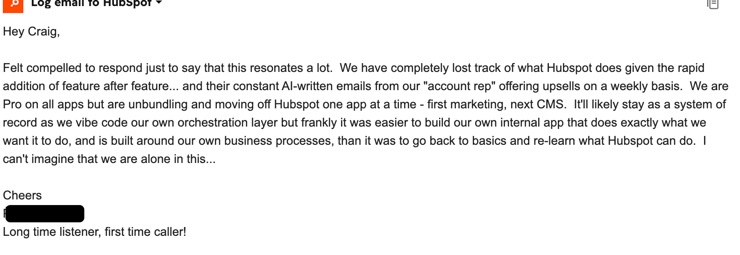
Let’s put the overwhelm in context with HubSpot, across three main HubSpot experiences:
|
HubSpot Product |
HubSpot Pricing |
HubSpot People |
|
Score: 10/10 |
Score: 5/10 |
Score: 3/10 |
|
Excellent product Overwhelming release velocity and UI changes |
Bewildering pricing Contract remorse Marketing contact tiers HubSpot Credit tiers
|
Sales reps are despised Support team is getting better but is still AI slop at times |
All of the complaints (check G2 and Google reviews) are about the sales teams and contracts. All the good reviews are about the product. And if you read a bad review about the product, when you dig deeper it is usually because sales sold them something it wasn’t a fit for.
Summary: the product teams are doing impressive work, the pricing strategy and leadership of the company concern me.
With all that in mind, what are we discussing this episode and who is it useful for?
In this episode we’re going to cover:
We’ll use a six step approach to evaluate your renewal needs:
You can download a PDF flyer of the Six Step process from here.
You can find your current subscription details under the profile menu (top right) and then (if you have permission) drill into Subscription details:
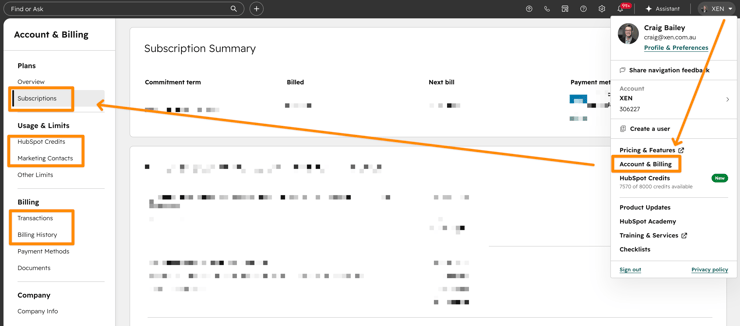
You can also review previous transactions and history.
Note: you may have multiple subscriptions, so be sure to scroll down the entire page.
Start by asking HubSpot about your portal:
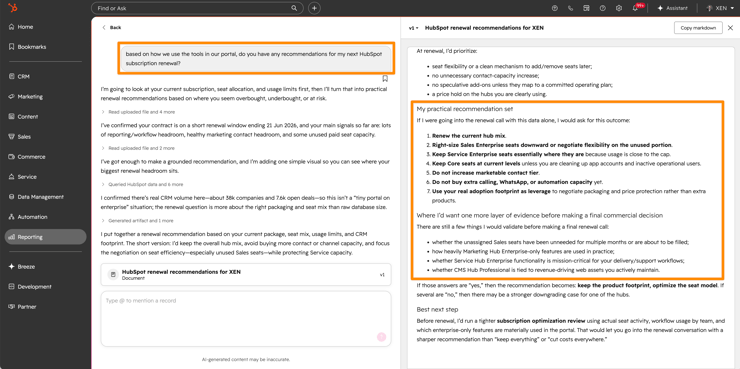
Here’s a simple prompt to use: ‘based on how we use the tools in our portal, do you have any recommendations for my next HubSpot subscription renewal?’
If you are a long time customer (eg more than 5 years) then you should be very careful when making any changes to your subscription.
You may lose legacy discounts and legacy inclusions if you change the subscription components.
HubSpot are usually pretty good about grandfathering in tools and feature access though.
There are two main ‘consumption’ items to review:
One of the surprise aggravations of these items is that they don’t reset each month.
For example, if your original contract includes 7,000 marketing contacts on Marketing Professional and you go over one month. Your marketing contact tier immediately increases (eg to 12,000). Even if you reduce it down below 7,000 before the next month, the contact tier stays at 12,000 for the rest of your contract.
In my opinion, this is probably the most unfair thing HubSpot has enforced in its contracts, and it frequently frustrates clients.
They haven’t changed their ways, however, because when they rolled out HubSpot Credits in the past year, they’ve enacted the same frustrating practice. HubSpot Credit tiers go up, but don’t come down.
Until renewal, that is. Your renewal is your only chance to bring down the tiers. Make sure you use this proactively.
The following table highlights the main tools and features in each hub, comparing Pro to Enterprise.
We’ve cherry-picked what we consider to be the main features - obviously there is much more included in each hub than listed below.
You can use the table to consider:
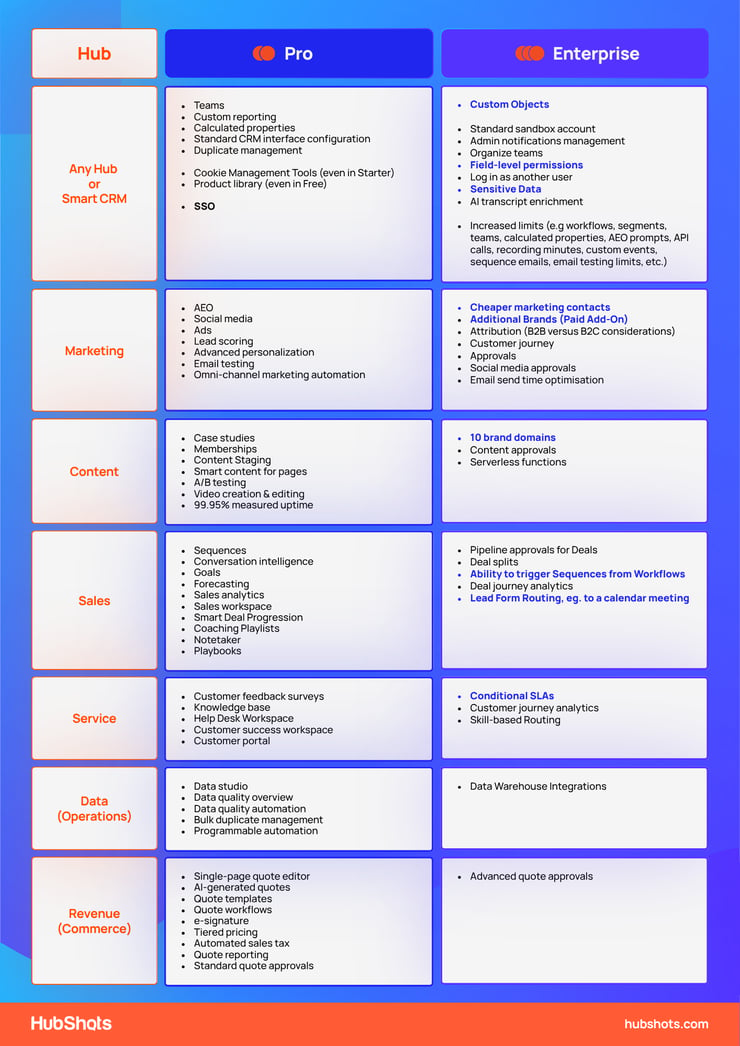
Here’s a selection of common scenarios that we see where downgrading is potentially prudent:
|
Before |
After |
|
Marketing Enterprise with 3 Brand Add-ons |
Marketing Pro with brand custom property Content Enterprise with Brand domains
|
|
Sales Enterprise |
Sales Pro with Tasks for enrolling contacts in Sequences
|
|
Enterprise for SSO |
Pro with SSO |
|
Multiple Service Seats for chat handovers |
Single Service seat and Customer Agent |
And here’s a selection where upgrading is recommended:
|
Before |
After |
|
Marketing Pro with brand custom property Content Enterprise with Brand domains |
Enterprise with 80,000 marketing contacts |
|
Sales Pro with a number of Sequence options |
Enterprise with Sequences added by workflows |
|
Sales Pro with no custom object |
Sales Enterprise with custom objects |
|
Service Pro with single property SLA |
Service Enterprise with conditional SLAs |
|
Service Pro with no skill routing |
Service Enterprise with skills-based ticket routing |
There are a bunch of add-ons available for HubSpot portals, including:
Some of these may have been purchased years ago and no longer needed (Eg a Brand Add-on that is no longer used, Ads Limit Increase or Reporting Limit Increase), so worth reviewing carefully as some of them are expensive (eg brands, transactional email).
Contracts are often complicated, and changing the mix can affect discounts.
The main levers in contracts are:
HubSpot Smart CRM is available in one of two ways:
It is becoming common for portals to purchase a single Smart CRM Enterprise seat to unlock general (ie global) enterprise features.
Smart CRM functionality is basically all the items under the CRM menu (with the exception of Playbooks):
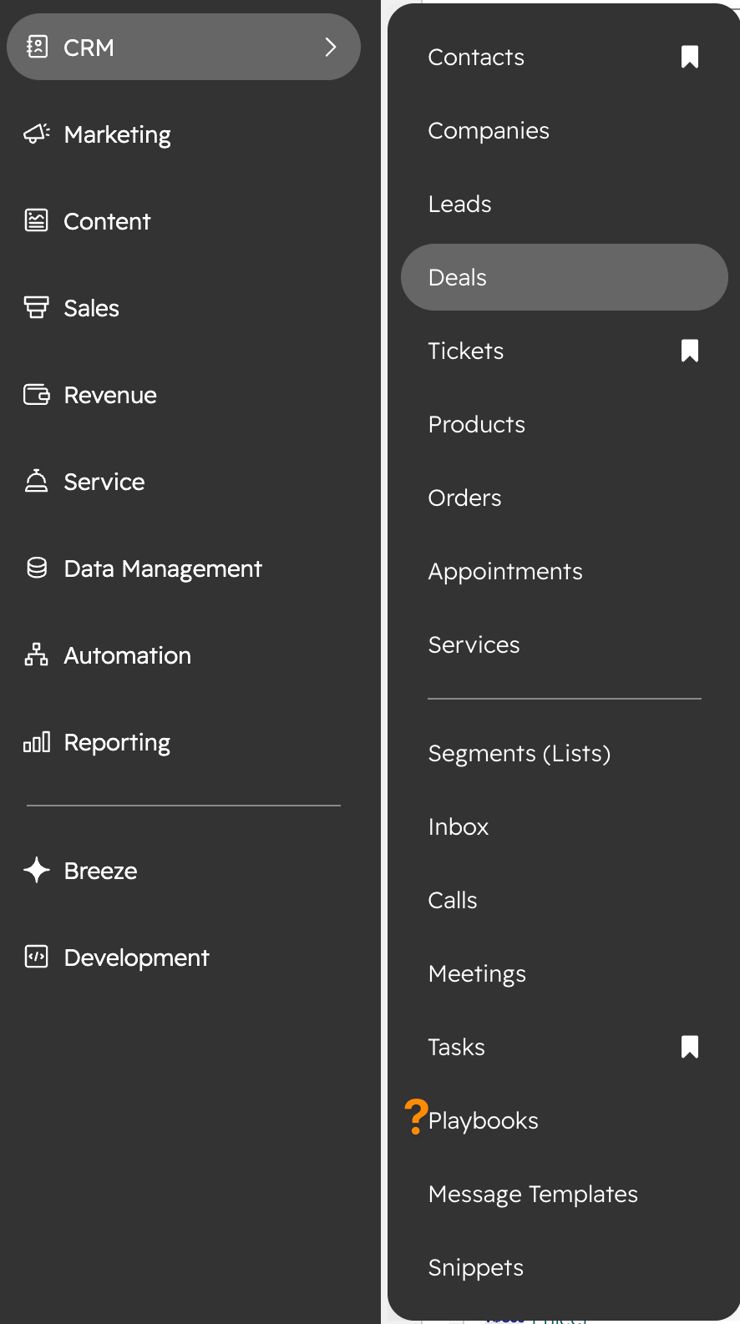
Before we dive into the individual hubs, it’s worth highlighting a few key benefits of an Enterprise seat (for any hub, including Smart CRM).
The most common reason: Custom Objects
The ability to create your own custom objects, with their own properties, pipelines and automation workflows.
(Note: it is possible to stay in Pro, and hijack some of the new optional objects.)
Probably the other most common reason we recommend having at least one Enterprise seat. The ability to mark some properties as sensitive and lock them down to very specific users (or teams).
There’s also an increase in general limits when adding Enterprise, including: workflows, segments, teams, calculated properties, AEO prompts, API calls, recording minutes, custom events, sequence emails, email testing limits, etc
Approval processes often end up in Enterprise as well (eg email approvals, web page approvals, quote approvals, etc)
Team management, Sandboxes, some AI enrichment features.
SSO used to be an Enterprise function, but it is now available in Pro!
Marketing Hub has a ton of functionality at the Pro level, so moving to Enterprise (a significant investment) needs to be a considered decision.
At the Pro level, you have Ads, Social, Emails, Campaigns, Forms, Reporting, Buyer Intent, Lead Scoring, SEO & AEO tools.
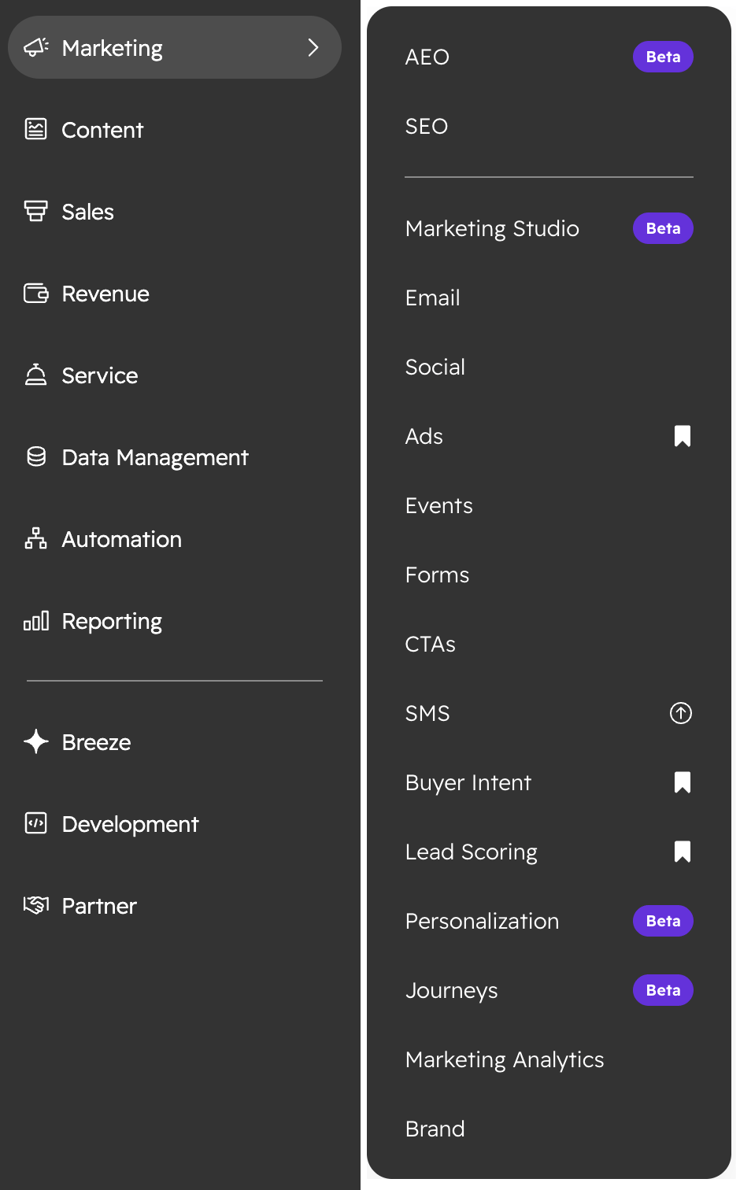
So what do you get in Enterprise that is worth the upgrade?
Probably the easiest way to decide if you are better off with Marketing Enterprise is how many marketing contacts you need.
Once you hit around 70,000 marketing contacts, Enterprise starts to pay for itself (note: this is based on RRP, if you get discounts, the number might be different).
Marketing Contact pricing comparison is complex because the price steps down based on higher numbers, but as a rough guide, if you are approaching 70,000 contacts, then it’s time to crunch the numbers.
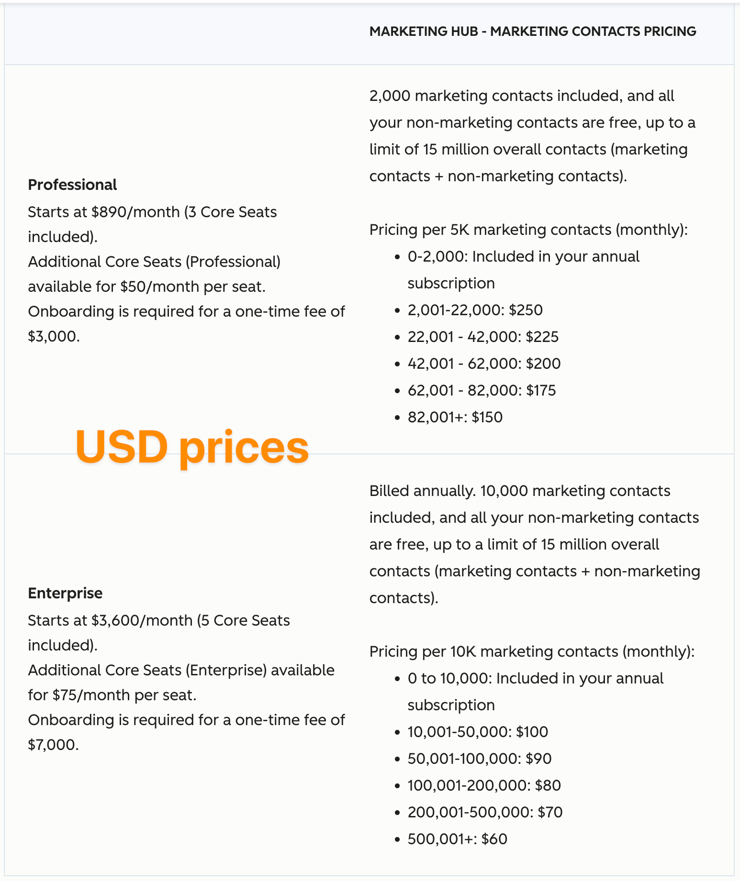
If you have lower marketing contact requirements, the following functional areas will be the deciding factors for you.
Brand Add-ons are an Enterprise only option.
But do you need additional brands?
Firstly, brand domains. These are just additional domains you can use eg we have hubshots.com, xen.com.au and xencreate.com.au as separate brand domains in our portal. You don’t need Marketing Enterprise for this, you can just get Content Enterprise, as it includes 10 additional domains.
But what if you need to differentiate and segment your portal assets and records more fully, not just a different domain?
This is where Brands come in. Brands provide a number of additional separation functions including:
Each additional Brand includes its own domain.
We’ve worked with a number of large companies, and often they don’t need Brands, even though they are pushed down that path by sales reps.
Attribution often comes up as a key differentiator between Professional and Enterprise.
This includes revenue attribution (ie deal dollars, not just deal count) and customer journey analytics.
A few years ago this was a big drawcard for marketing teams.
In recent years, we’ve found that, in practice, hardly any marketing managers get anything resembling proper attribution, usually because only a subset of activities is being tracked/logged. When all the data is tracked, attribution is powerful, when only a subset, the attribution is less useful (and potentially misleading).
Marketing contacts, Brands, and Attribution are the main areas to consider.
Sales Pro has many useful tools, including Meeting Scheduler, Sequences, Playbooks, Forecasting, Sales Analytics, Notetaker, and more.
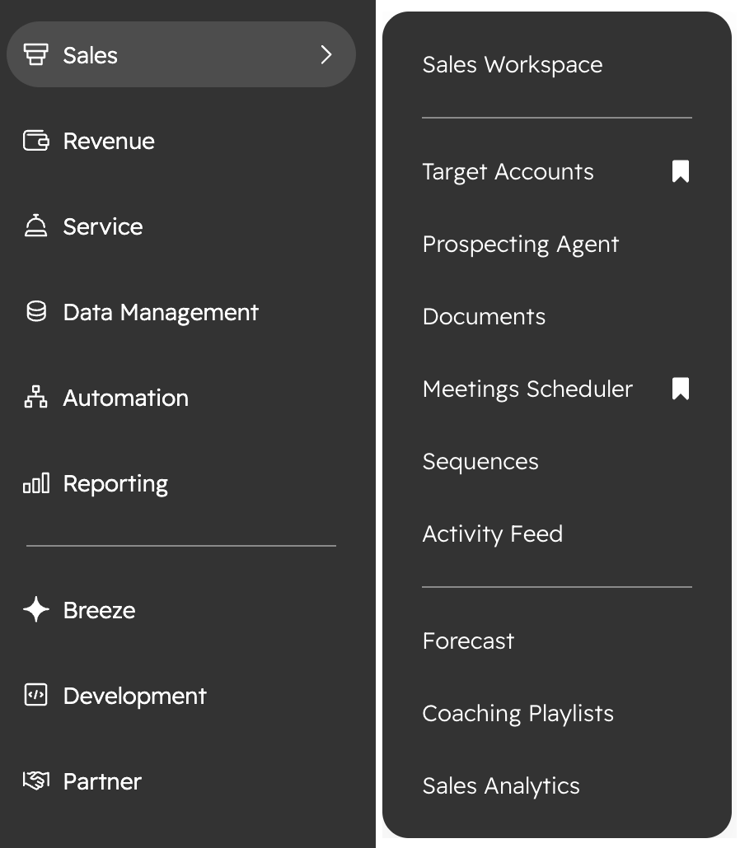
So what are the benefits of upgrading to Enterprise?
This is the main reason to upgrade to Enterprise.
Automatically enrol a contact into a sequence. That’s it.
This is handy and just means you can redirect a form submission to a Meeting page (as opposed to a standard thank you page).
Currently you need a Sales Seat or a Service Seat for Meetings Advanced Scheduling features , and a Sales Pro Seat for Notetaker.
Which is so at odds with how most companies work.
In our company, I’d estimate only 5% of our meetings are Sales meetings. The majority are delivery and project management meetings. Ie our delivery team. Not the sales team. Not the customer support team. The delivery team.
All of these meetings we want to give customers the option to book in with us, and for the Notetaker to join and record - we want all that data pulled into HubSpot.
We don’t want to need a Sales or a Service Pro seat for this.
Aside: it would be so much easier if HubSpot just had a single seat (ie similar to Zoho and their Zoho One option).
Service Pro includes Helpdesk & Ticketing, Knowledge base, and Surveys as the main features. Chatflows and Customer Portal are also available but are less compelling.
Customer Agent appears under the Service Menu, but is actually available with any Pro seat (ie it doesn’t have to be Service Pro).
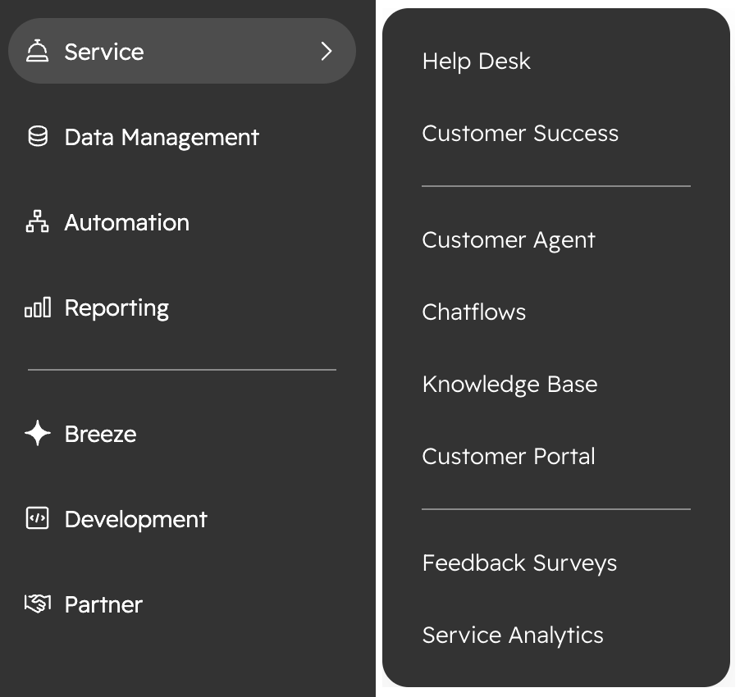
What does upgrading to Enterprise provide of significance?
One of the nice features of Service Pro is SLAs.
And with Helpdesk (as opposed to just Inboxes) there are improved SLA options.
However, they can only be tailored per ticket on a single property (eg Priority).
With conditional SLAs, tailoring can be more granular based on multiple properties, e.g., per company or per custom property (e.g., VIP status).
This might sound quite niche, but is actually common in larger companies - they often need to tailor SLAs per company, usually as part of support contracts. Being able to create conditional SLAs is very handy here. Alternatives need to make cumbersome workarounds eg separate ticket pipelines for a specific client etc.
Upgrading to Service Enterprise makes sense for these scenarios.
Content Hub Pro includes Landing pages, website pages, blogs, staging, smart content, and A/B testing as the main features.
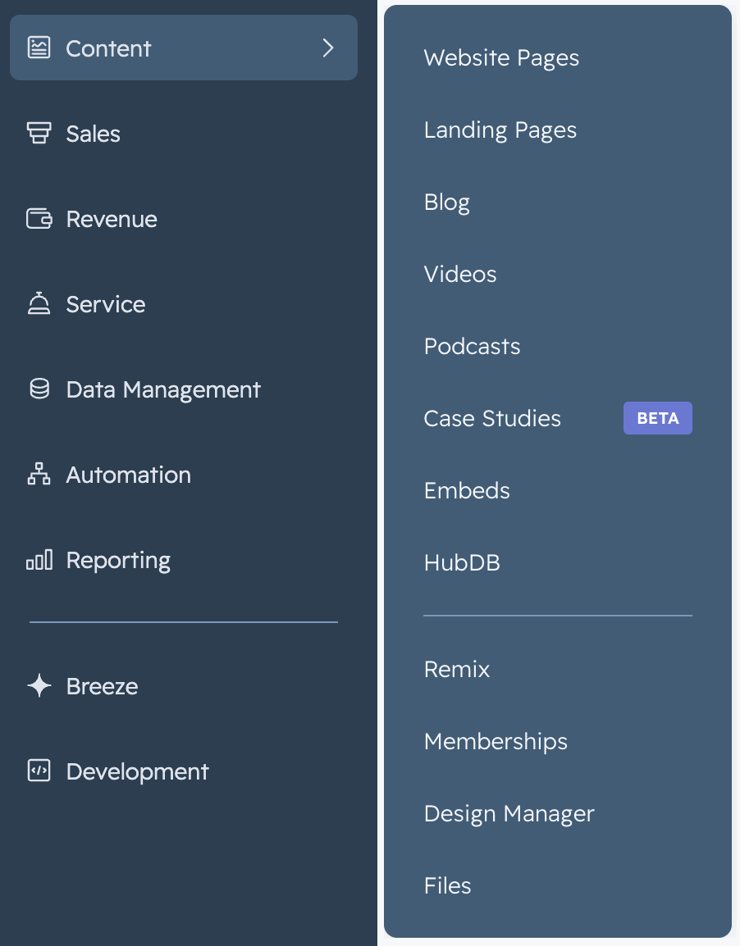
Note: If you are a long time HubSpot customer with Marketing Hub, then you may have legacy access to some of these tools eg Landing pages, blogs, smart content, A/B testing.
The main reason we recommend upgrading to Content Enterprise is for the additional domains.
A client will want to spin up a microsite, or campaign site.
Much less expensive than going down the Marketing Enterprise plus Brand Add-ons path (see earlier Marketing Shot as well).
Content Pro allows you to create secondary domains that are subdomains of your main brand.
For example if your brand is mybrand.com, you can add subdomains such as microsite.mybrand.com, eventsite.mybrand.com, etc. This is all allowed in Pro.
A number of our clients will have a top-level domain that they redirect to a subdomain hosted in HubSpot, so they can just need Pro.
For example, they register the top-level domain such as myeventsite.com and redirect it to eventsite.mybrand.com.
Content approvals and Serverless functions.
I wouldn’t be surprised if HubSpot rolls out a bunch of agentic controlled website functionality in the coming months. It will be interesting to see what Tier it requires. If they limit it to Enterprise, it will be a coffin in the nail of HubSpot as an AI-enabled Content Management System (CMS).
Data Hub Pro is useful for doing data imports and cleaning.
The only reason you would upgrade here is the Data warehouse integrations.
However, neither of us have used any of these integrations, so we’re not in a position to advise on this.
This seems to be the main benefit of upgrading from Pro to Enterprise.
You can set up custom, flexible approval workflows based on specific criteria, such as pricing, discount amounts, or any property of associated objects.
However, neither of us has used this, so we’re not in a position to advise on this.
A reminder of the first step we mentioned at the start - you can ask HubSpot about your subscription.
You can ask it to estimate price changes as well, but note that it usually returns USD pricing based on the KB articles (rather than your portal currency).
Especially if you have had legacy discounts, this could revert to stepped discounts moving forward.
Also, never trust that a HubSpot rep has your best interest in mind. They will often send out special offers that might work for most portals, but they need to be double-checked with your specific portal history.
For example, an offer to move to annual payments and receive an additional discount, but in the process it cancels out a permanent discount that had been in place. This has often happened when we check quotes.
“I really appreciate the independent perspective and insight you guys provide via HubShots podcast, which I have been listening to just as soon as they drop for at least the last 3 years now.”
No matter how hard you have been working on something, you shouldn't hesitate to make changes midway through if you realise it's no good. Never, ever think of that as a waste.
Japanese media personality
Would a quick HubSpot related tip in your inbox every day be useful? If so, sign up here.
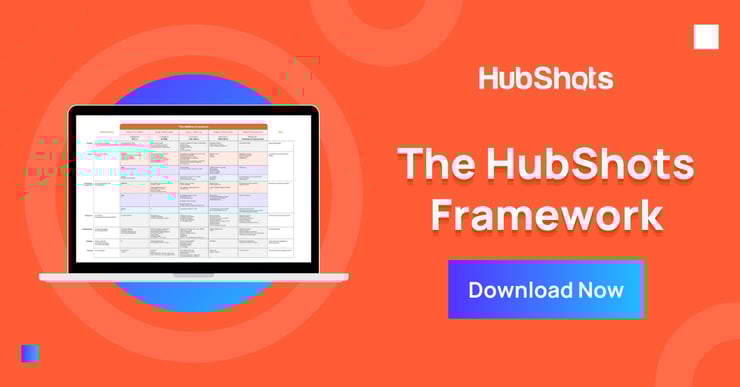
Download a copy of the HubShots Framework.
Connect with HubShots here:
Connect with Ian Jacob on LinkedIn and Craig Bailey on LinkedIn plus check out his personal YouTube channel.
HubShots, the podcast for marketing managers and sales professionals who use HubSpot, hosted by Ian Jacob from Search & Be Found and Craig Bailey from XEN and XEN Create.
HubShots is produced by Christopher Mottram from Podcastily.
We record using Riverside.
Please share this with colleagues - it helps us improve and reach more marketers.
In this edition we dive into, INBOUND 2025 Reflections, HubSpot’s Loop Marketing Playbook, what is it, and why, and more!
This episode we chat about adding ad reports on HubSpot dashboards, avoiding template gotchas, and whether you need to prepare for CCPA.
This episode we dive into the move to consolidation of tech stacks, quick HubSpot improvements to GSuite add-in, custom fonts in marketing emails and...